What Is DHCP – Overview of IP Address Assignment
In today’s world, it’s more important than ever for devices to be efficiently networked once they connect. DHCP, meaning Dynamic Host Configuration Protocol, is the mechanism for ensuring that devices can coexist on networks to which they're joined. In this article, we’ll define what DHCP is, how it functions, how to enable it on your computer, and provide examples for both ISP and router DHCP.
What is DHCP?
DHCP, or Dynamic Host Configuration Protocol, is a network management protocol used for assigning IP addresses. It helps configure local networks and ensure that each device is correctly configured in order to join networks.
On a network, no two hosts can have the same private IP address. Therefore, manual IP address configuration will likely cause problems and increase the risk of creating an IP address conflict. The Dynamic Host Configuration Protocol server solves this issue by automatically assigning each newly connected host a unique IP address. It also assigns other Dynamic Host Configuration Protocol options, including the subnet mask, gateway address, and the domain name server (DNS) address, to continually keep networks manageable. Most home routers are set to use Dynamic Host Configuration Protocol rather than manual assignment.
While IP address assignment can be either static or dynamic, DHCP assigns temporary dynamic addresses from address pools, meanings it’s a dynamic protocol.
How DHCP works
On the user’s end, Dynamic Host Configuration Protocol is simple, as the protocol does all the work for IP address assignment and management once enabled. As devices connect, Dynamic Host Configuration Protocol assigns IP addresses and properly configures the device’s network properties. As network devices leave and their IP leases expire after a period of time, the information returns to the local DHCP server database for it to reassign to other devices.
There are several essential parts of the Dynamic Host Configuration Protocol process: the relay host, the clients, the servers, and messages. A DHCP relay agent is any host that forwards information packets between clients, which are the users, and servers, where data is stored. These information packets are called DHCP messages. Relay agents routinely forward client requests and replies between clients and servers when they aren’t on the same physical subnet.
Dynamic Host Configuration Protocol runs at the application layer of the TCP/IP (Transmission Control Protocol/Internet Protocol) stack to dynamically assign IP addresses to DHCP clients and allocate TCP/IP configuration information.
When a Dynamic Host Configuration Protocol server receives the message from the client, it also broadcasts a Dynamic Host Configuration Protocol offer message over the Ethernet network, informing the client of the message’s availability. Often, when a client can't get a successful connection to the DHCP server, their device assigns itself a 169.254 IP address.
What is a DHCP server?
A DHCP server is the device that runs and manages the Dynamic Host Configuration Protocol information, including IP address information. In many cases, it’s the router in your home, the meaning of DHCP servers is any device that performs the Dynamic Host Configuration Protocol. DHCP servers receive the necessary information and set up the client, performing essential functions in the DHCP process.
Other important DHCP entities to understand are the DHCP client and the DHCP lease time. A DHCP client can be any device on a network; it’s the recipient of the IP address and other assigned information from the DHCP network server. A lease is simply the length of time that a Dynamic Host Configuration Protocol server allows a device to hold a particular IP address. When the DHCP lease expires, the device can receive a new IP address.
How to enable DHCP on your computer
To configure your computer to work with a DHCP server, follow these instructions.
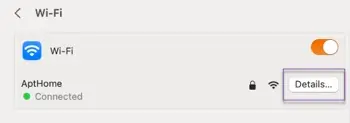
For Mac users, find the Network menu, typically found in System Settings.
1. Once it’s open, select WiFi or, if you're connected via a LAN cable, choose Network in the left panel.
2. Click Details for the connection and select the TCP/IP tab.
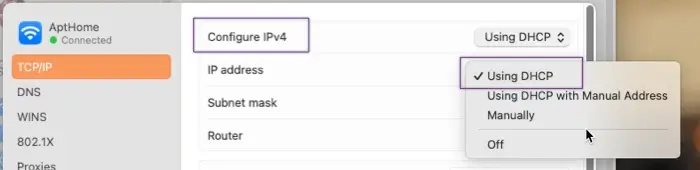
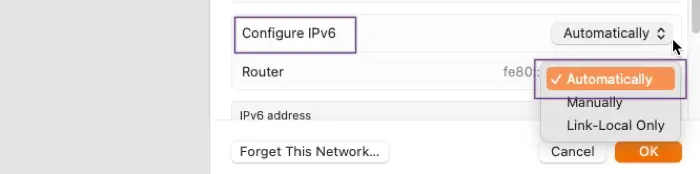
3. In the Configure IPv4 section, select Using DHCP. Select OK to save your changes. For IPv6, select Automatically from the dropdown in the Configure IPv6 section.
For Windows users, find your Network & Internet settings. Go to the advanced settings.
1. Select either your Ethernet or WiFi and view additional properties.
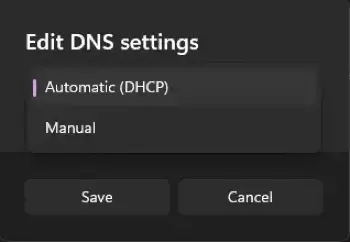
2. Next to IP Address Assignment, click Edit.

3. Choose Automatic DHCP and save your settings.
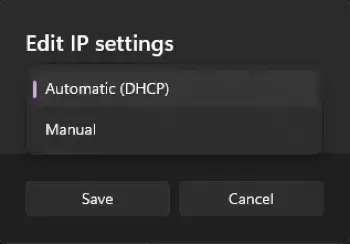
4. Do the same next to DNS Server Assignment and save your settings.
Whether you want to use your router as your DHCP server is up to you. On your home network, your router serves as a simple DHCP server that assigns necessary information to hosts. However, on the other hand, a dedicated DHCP server on a large network gives the LAN admin control over IP address assignment and IP Address Management. Choose what works best for your network and connections.
DHCP server examples
DHCP protocol via ISP
Your Internet service provider (ISP) has a Dynamic Host Configuration Protocol server that assigns IPs by modem MAC addresses. When your modem comes online, it communicates with the network indicating that it needs an IP address. The server receives the message and communicates with the modem.
The modem then transmits its MAC address to the server. At this point, either the modem uses an IP address already reserved for it or it receives an IP address assignment. This is why cloning your MAC address can potentially get you a different IP from your ISP.
DHCP protocol via routers
Under the General Setup or LAN Setup tab in most routers, there is a setting option for Dynamic Host Configuration Protocol. This option can control how many IPs are ultimately assigned and can enable or disable the server portion of the router. If the user disables the server option, each IP address must be statically assigned to each computer. This applies for both wired and wireless connection.
Benefits of Dynamic Host Configuration Protocol
As discussed, management of IP addresses can be cumbersome, especially as networks grow. Dynamic Host Configuration Protocol servers simplify IP address management by:
- Preventing IP address conflicts. Manual entry of Internet Protocol (IP) address information can cause duplicate IPs or incorrect IPs, both of which are difficult to discover. With a Dynamic Host Configuration Protocol server, the IPs will always be unique and will always be able to connect to the network.
- Automating management processes. With a Dynamic Host Configuration Protocol server, the network administrator doesn’t need to manually keep track of which device owns which IP address. Additionally, it allows organizations to easily update their IP address schema and network configuration.
Frequently asked questions
What is the meaning of DHCP?
DHCP means Dynamic Host Configuration Protocol.
Is DHCP the same as IP addresses?
No, Dynamic Host Configuration Protocol is not the same as an IP address. Dynamic Host Configuration Protocol is a protocol for assigning IP addresses; the two are connected, but DHCP is not a type of IP in itself.
Do all routers have Dynamic Host Configuration Protocol?
All routers have the capability to use Dynamic Host Configuration Protocol. Though not all have the DHCP server enabled by default, most of them do.
What's DHCP lease time?
Though it may vary by server or network, the standard default DHCP lease time is 24 hours.
What port is DHCP?
DHCP clients and servers use separate ports. The Dynamic Host Configuration Protocol server uses the UDP port number 67, while clients use the UDP port number 68.