How to Trace an Email Address for Free
As more people get online, the number of scammers sending malicious content – including fake emails – increases. Email spam is an annoyance for all and can leave unsuspecting users vulnerable to malware attacks or even identity theft. Fortunately, a great way to help investigate and confirm an email is spam is by tracing the email address via email headers. The following steps will walk you through how to trace an email address for free to assist in avoiding email phishing scams as well as other types of abuse.
How can I trace an email?
Email address tracing is easy. Every email contains the information you need to trace it back to the original sender’s IP address. An email has two parts: the body, which is the information sent to the recipient within the message, and the header.
The email header includes the ‘To,’ ‘From,’ ‘Date,’ and ‘Subject’ lines, but it also contains important metadata within the email. The body of an email contains no traceable information. Therefore, the only way to trace an email address back to its owner is by analyzing the email header.
What are email headers?
Email headers are snippets of code that contain metadata about the email, including the email’s route, content type, and date of delivery. It helps authenticate the email. They also contain information about the message and its originating IP address, which is the IP address of the sender. The header information can help you trace the IP address that sent the message, essentially helping you find a location by email.
Why trace an email header?
Email headers are essential to track down any malicious emails, spam, or other reasons to track where the email came from. If someone is spamming you or sending you threats via email, you can use the email header data to possibly trace the originating IP to get the location of the sender, essentially finding an IP from an email for free. Additionally, using email headers to trace an email address will allow you to flag emails from particular senders to avoid future email phishing scams.

Note that it’s not necessarily possible to trace an email right back to the person or entity that sent it. At most, the results of the trace will show you the original email IP address and the computer name that sent the email. However, this data still works as an email address locator and helps you prevent future spam emails and allows you to report IP abuse if necessary.
How to trace an email header
To do a free email trace, you first need to locate the header. Each email program varies as to how users can get to the message options. However, regardless of program, the headers are easily accessible. These steps work for Microsoft Outlook, Gmail, Yahoo, Live, Hotmail, and any other email application, email server, or email client.
Outlook 2010, 2013, and 2019 (Windows Only)
Follow these steps to learn how to view an email header in Outlook and trace the email:
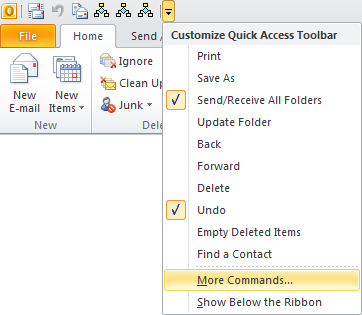
1. Add Message Options to the Quick Access Toolbar by selecting the down arrow in the upper left corner and choosing More Commands. If you already have Message Options on your Quick Access Toolbar, proceed to step 3 below.
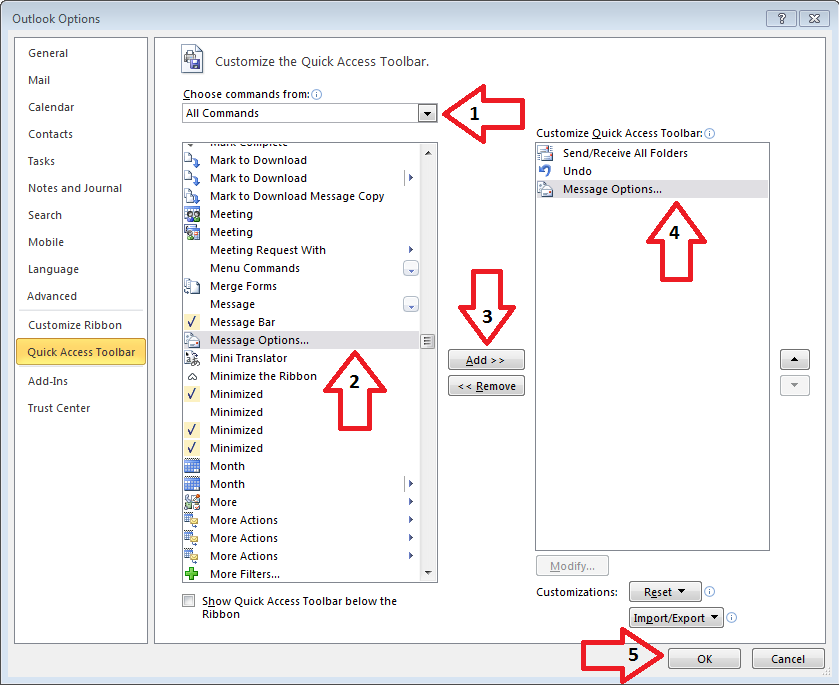
2. When the pop-up window comes up, follow these steps (See image below):
- (1.) Choose All Commands from the top dropdown.
- (2.) Scroll until you find Message Options, then select it.
- (3.) Select Add in the middle of the console.
- (4.) Message Options should now show up as a chosen command.
- (5.) Select OK. You should now see the Message Options icon in your Quick Access Toolbar at the top left corner.
3. Select the email from which you wish to get the headers.
4. Select the Message Options icon in the top left corner. A box similar to the one below should appear.
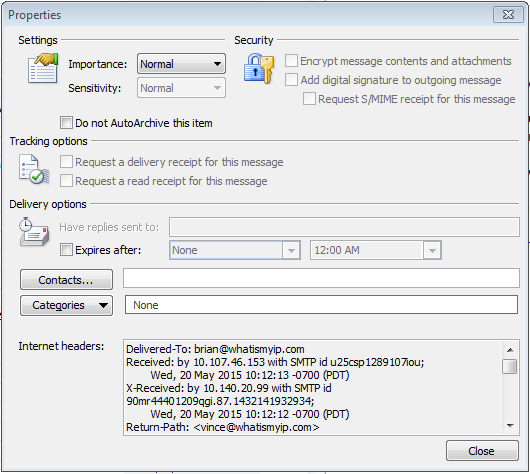
5. Copy the data in the Internet headers box by clicking within the box and pressing Ctrl+A to select all the text. Then press Ctrl+C to copy the highlighted text.
6. Paste (Ctrl+V) the data into our Email Header Analyzer Tool and click Analyze.
Gmail
Follow these steps to learn how to trace an email in Gmail:
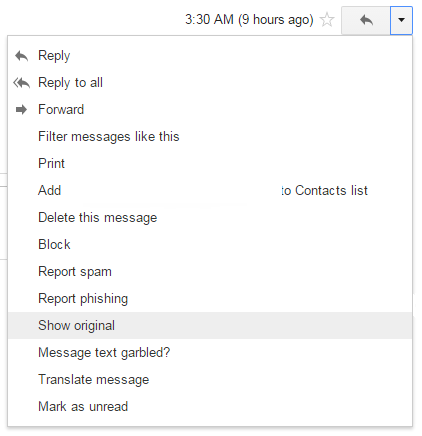
1. Open an email within your web browser. Select the drop-down arrow next to the Reply button in the top right corner and choose Show Original from the drop-down menu.
2. Once the new page opens (the example is not shown for security reasons), press Ctrl+A, then Ctrl+C to copy all of the data within the window on a PC. On a Mac, press Cmd+A, then Cmd+C to copy all data within the window.
3. Paste (Ctrl+V) the data into our Email Header Analyzer Tool and click Analyze.
Once you know how to trace Gmail messages, you can analyze any message in Gmail to potentially see who sent it and where it came from.
Yahoo!
Follow these steps to learn how to trace an email in Yahoo!:
1. Open an email within your web browser. Next, select the More drop-down arrow and choose View Full Header.
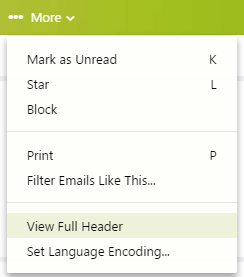
2. Once the new page opens (the example is not shown for security reasons), press Ctrl+A, then Ctrl+C to copy all of the data within the window on a PC. On a Mac, press Cmd+A, then Cmd+C to copy all data within the window.
3. Paste (Ctrl+V) the data into our Email Header Analyzer Tool and click Analyze.
Live.com, Hotmail.com, and Outlook.com
Follow these steps to learn how to trace an email on Live.com, Hotmail.com, or Outlook.com:
1. Open an email within your web browser. Next, select the Actions drop-down arrow and choose View Message Source.
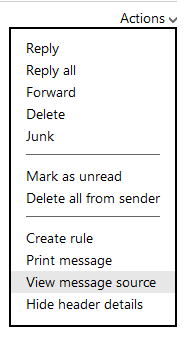
2. Once the new page opens (the example is not shown for security reasons), press Ctrl+A, then Ctrl+C to copy all of the data within the window on a PC. On a Mac, press Cmd+A, then Cmd+C to copy all data within the window.
3. Paste (Ctrl+V) the data into our Email Header Analyzer Tool and click Analyze.
Outlook for Mac
Follow these steps to learn how to trace an email in Outlook on Mac:
1. Open an email within Outlook. Right-click the email and choose View Source.
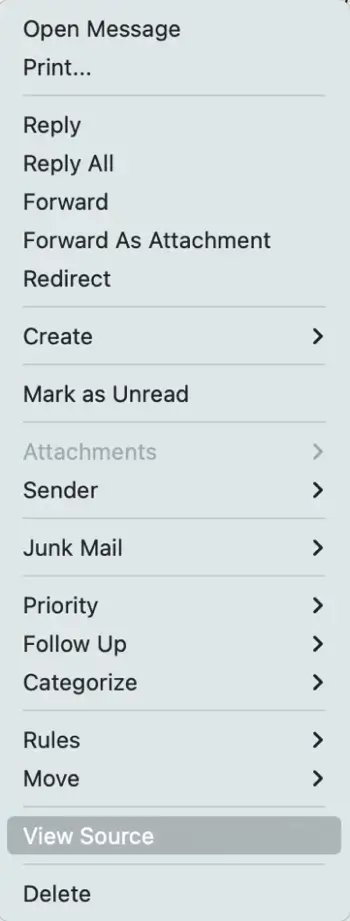
2. Copy all of the data from the View Source window and paste it into the Email Header Analyzer Tool. 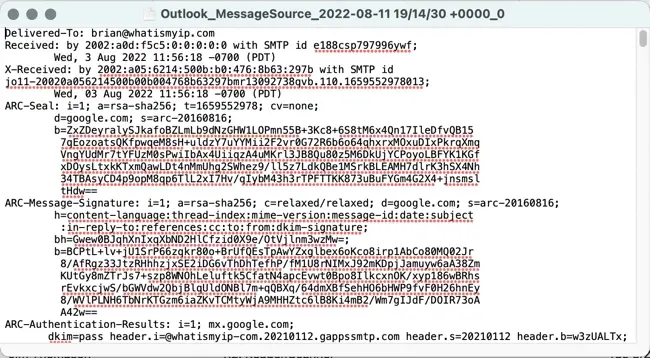
Using the email header analyzer tool
Regardless of the email client you use, the Email Header Analyzer Tool is necessary for tracing an email header. It serves as an email address locator, as the email header tracer returns the IP attached to the initiating point. You can use the homepage of What Is My IP to find your IP address.
Once you have the IP address, use the IP Address Lookup Tool to look up the IP address and determine the originating location of the email sender. IP address location information doesn’t include a street name, house number, or phone number; the trace email information will most likely determine the city and the ISP the sender used.
Can you always trace an email address for free?
No, you cannot always trace an email address for free. For example, someone who sends a message to your Hotmail account shows in the X-Originating IP section of the headers. However, someone who sends you a message from Gmail will only trace back to a Google IP address.
Tracing an email address may not always bring you right to the email sender, but it does give you a starting point for further investigation. You can also sometimes find someone online for free by using their email address in a Google search. However, if you’re looking to trace the origins of an email address or email message, follow the steps above to find an address with an email and see where the results take you.
Frequently asked questions
Can a Gmail email be traced?
Yes, a Gmail email can be traced using the message's email header and the email header tool. Once you get the header, you can enter it into the trace tool to retrieve the originating IP address and trace the message.
Can a Yahoo! email be traced?
Yes, a Yahoo! email can be traced using the message's email header along with the email header tool. Once you get the header, enter it into the email header tool to retrieve the originating IP address and trace the message.
What's the typical email header size?
A standard full email header is between 600 to 800 pixels in width and between 100 to 150 pixels in height.
What information can you get from an email address?
Though email addresses don't contain personal information independently, you can use an email address to find anything on the public Internet that contains that address. Some people also use personal information to create their email address, like [email protected]. This can tell you more about the person. However, if you get an email from an address, you can trace the header to locate the sender's IP and gather more information about them.