IP Commands for DOS/Windows
DOS/Windows IP commands are used to perform several tasks, like assigning an Internet Protocol (IP) address to a network interface or configuring network interface parameters. Included in this article are only some of the types of commands that are available.

Common IP commands for Windows and DOS
Below, you'll find a list of the most common IP address commands for Windows and DOS. These include ipconfig command, trace route, netstat, arp, route, hostname, control netconnections, and other popular Internet Protocol commands for DOS and Windows.
| Description | DOS/Windows IP Command |
|---|---|
| Connection Configuration | ipconfig /all |
| DNS Cache Info | ipconfig /displaydns |
| Release All IP Address Connections | ipconfig /release |
| Release IPv6 Connections | ipconfig /release6 |
| Renew All IP Address Connections | ipconfig /renew |
| Renew IPv6 Connections | ipconfig /renew6 |
| Re-Register the DNS Connections | ipconfig /registerdns |
| Change/Modify DHCP Class ID | ipconfig /setclassid |
| Change/Modify DHCP Class ID for IPv6 | ipconfig /setclassid6 |
| Network Connections | control netconnections |
| Network Setup Wizard | netsetup.cpl |
| Test Connectivity | ping whatismyip.com |
| Trace Route | tracert |
| TCP/IP protocol sessions | netstat |
| Local Route | route |
| Resolved MAC Addresses | arp |
| Name of Computer Currently On | hostname |
| DHCP Class Information | ipconfig /showclassid |
| DHCP Class Information for IPv6 | ipconfig /showclassid6 |
| Name Server Lookup | nslookup whatismyip.com |
| Clear DNS Records | ipconfig /flushdns |
| Displays Information for All Compartments | ipconfig /allcompartments |
| Displays Available Options | ipconfig /? |
What is the use of IP commands?
IP commands are tools that Linux network admins use to configure the network environments in which they work. There are IP DOS commands for checking connectivity, seeing DNS caches, and so much more.
To check your public IP, go to the What's My IP Address homepage and you'll find your IPv4 and IPv6 addresses.
Defining IP commands
If you aren't familiar with each IP command and what they do, scan through these simple explanations to get an idea of how each command is used.
ipconfig /all
The ipconfig /all command shows all the information about your network adapter. It helps configure your connection by providing important details about the physical address, DHCP and DNS servers, the subnet mask, and default gateway, among other things. You can also see your IPv4 address and IPv6 address with this command, assuming you have both an IPv4 and IPv6 address.
ipconfig /displaydns
The ipconfig /displaydns command gets rid of your computer's DNS resolver cache. The cache essentially keeps a record of your activity so that you can get to a site faster the next time; it notes domain names and previously-visited IPs. The /displaydns command shows the records name, record type, time to live, section, and A records for the DNS resolver cache.
ipconfig /release
The ipconfig /release command shows network data, but it's especially helpful if you need to reset or release IP address connections. When you allow the DHCP protocol, it sends DHCP requests from that server, meaning that DHCP servers will no longer be contacted for assigned IPs. The command stems from the network adapter's IP address, so the request only enables use with the network adapter DHCP.
ipconfig /release6
The ipconfig /release6 command, like the /release command, resets or releases IPv6 connections.
ipconfig /renew
The ipconfig /renew command applies to all adapters within a system, as long as it's DHCP. It renews both IPv4 and IPv6 addresses.
ipconfig /renew6
The ipconfig /renew6 command is a variation of the /renew command that renews IPv6 addresses.
ipconfig /registerdns
The ipconfig /registerdns command creates or updates records within your DNS registry. It manually registers the DHCP release if it doesn't happen on its own. The command also helps with fixing DNS name issues in-computer.
ipconfig /setclassid
The ipconfig /setclassid command allows you to assign a class ID to a system adapter. You can specify which class ID in the command, but this is the general parameter to assign the ID. It also removes class IDs in certain cases.
ipconfig /setclassid6
The ipconfig /setclassid6 command works the same as the /setclassid command, except it works just with IPv6 addresses and class IDs.
control netconnections
The control netconnections command opens the Microsoft Windows Network and Dial-up Connections window, allowing users to access all their network connections with one command.
netsetup.cpl
The netsetup.cpl command opens the Network Setup Wizard, which sets permissions on folders, adds keys to registries, changes protocols, and adjusts other aspects of the system to ensure that the device works on the network.
ping.whatismyip.com
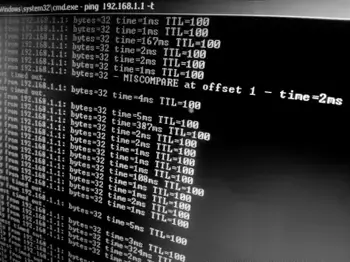
The ping command is a command-line request that uses a signal to check with a host server for availability and response time. It uses Internet Control Message Protocol Echo messages to determine whether the network host is active or not and the amount of packet loss on delivery.
tracert
The tracert command is another command-line utility that tracks the path an IP address takes to its destination. It monitors the packet from local computer to destination IP or domain, displaying the path to assess the time it took to arrive. The command is helpful for troubleshooting connection issues.
netstat
The netstat command is a networking tool that watches and assesses TCP/IP protocol sessions and connections over the network. It can show incoming and outgoing connections, routing tables, usage statistics, and more, including the local and remote IP addresses and ports. Like tracert, it helps troubleshoot connection problems or configure a solution.
route
The route command lets you manually enter data into network routing tables, dividing host routes and network routes via the destination's network address.
arp
The arp command displays ARP entries by hostname. It accepts hosts identified by name or by number. The command also modifies and shows Internet-to-adapter address translation tables.
hostname
The hostname command, quite simply, shows the name of the system you're currently using. You can use the command to change the name of the host as well.
ipconfig /showclassid
The ipconfig /showclassid command displays all the DHCP class IDs allowed for a certain adapter. It helps when setting a different class ID because it tells you the parameters or limits for a certain adapter.
ipconfig /showclassid6
The ipconfig /showclassid6 command is the same as the /showclassid command, just limited to IPv6 address data.
nslookup whatismyip.com
The nslookup command, or name server lookup command, gets information from name servers in a DNS service. It analyzes any address entries that are in in your DNS server's cache, then returns information like the current DNS server you're using, the domain URL, and IP addresses - both IPv4 and IPv6.
ipconfig /flushdns
The ipconfig /flushdns command flushes the DNS cache, which is helpful to troubleshoot DNS issues or remove incorrect domain information from the cache. It then refreshes the memory during browsing or daily activity, which gives you an accurate cache since the wrong information has been removed.
ipconfig /allcompartments
The ipconfig /allcompartments command displays the same data as the ipconfig command, just without any parameters. If you have multiple compartments, it shows the information for all of them.
ipconfig /?
The ipconfig /? command offers help to the user by showing all available commands and the best way to use them. If you struggle with knowing what IP command to use for what task, this command is especially helpful.
How to use the IP command
To use any of the IP commands listed above, open the IP address command prompt on your Windows computer. You can do that by following these steps:
- Go to your computer's Start menu.
- Open the command prompt by typing cmd into the menu.
- Enter the IP command you want to use and hit Enter.
You can enter as many commands into the command prompt as you need to get the information or functionality you're looking for.
How to monitor and manage IP addresses
IP address management, or IPAM, is the best way to monitor and manage IP addresses and their connections. With IPAM, users have more control over their networks. It simplifies the IPv4 and IPv6 address assignment process, as well as the addresses themselves, promoting easy maintenance of IPs.
IP address management can happen in several ways. Subnetting is a popular option; it creates logical subdivisions of larger networks to simplify networks and make them more cohesive. You can also use IP address managers, which are applications that integrate into the IP address structure and totally manage IP address functionality in a network. You can track and manage IPs, configure them with DHCP or DNS servers, and automate static IP address requests.
If you don't need the full capacities of an IP address manager, an IP address tracker also provides some of the same services. They can track IPs and detect potential IP conflicts, log events, and monitor subnets.
Using these tools, as well as the IP commands at your disposal, helps keep your IP addresses and networks properly connected and functioning.
Troubleshooting connection issues using IP commands
Ipconfig and ping are probably the two most commonly used commands from the list above. The ping and ipconfig commands allow you to quickly troubleshoot network connectivity issues. If you can't connect to a server on your local network or get to the Internet, pull up a DOS prompt by going to Start and typing in cmd in the search box. Then, press Enter.
After this, type ipconfig and see your IP address information. Make sure that the information displayed looks correct. For example, you could see IP 192.168.1.122, subnet 255.255.255.0, and default gateway 192.168.1.1. If this is the case, try to ping the gateway, which is likely your router. Type in in ping 192.168.1.1.
If you get a response, the device you're on is connected to the local network. If you don't get a response from the gateway or router and your IP address looks odd, like 169.254.0.0, then the device you're on does not have a legitimate IP address. At the command prompt, type ipconfig /release and press Enter, then type ipconfig /renew. Once the IP has renewed, check again to see if the IP looks normal.
In conclusion, these and other system Internet Protocol commands are command line tools to help assist in making sure our device connectivity is able to be corrected with a few simple tasks. If you need other IP commands, read about Linux IP commands, Unix IP commands, VMS IP commands, and TCP/IP commands.